
Augmented Reality for Remote Collaboration: Revolutionizing Distributed Workplaces
The landscape of work has fundamentally shifted, with remote and hybrid models becoming the norm for countless organizations worldwide. This evolution demands innovative tools that can bridge geographical distances and foster seamless interaction. Enter augmented reality for remote collaboration – a groundbreaking technology poised to redefine how distributed teams connect, communicate, and create. Discover how AR transforms virtual workspaces into dynamic, interactive environments, enhancing productivity and fostering a deeper sense of presence for geographically dispersed teams.
The Evolution of Remote Work and the Need for Enhanced Connection
For decades, remote work was a niche concept, often limited to specific industries or roles. The digital revolution, however, propelled us into an era where distance is no longer a barrier to employment. The recent global shift accelerated this trend, forcing businesses to adapt rapidly to entirely distributed workforces. While video conferencing and instant messaging have been invaluable, they often fall short in replicating the nuance, spontaneity, and tactile experience of in-person interaction. This limitation has highlighted a critical need for more immersive and effective communication tools, paving the way for augmented reality solutions for distributed work.
Traditional tools, while functional, can lead to communication silos, reduce contextual understanding, and sometimes even foster a sense of isolation among team members. The inability to naturally point, gesture, or share a physical object in a shared space impedes efficiency in complex tasks like design reviews, technical support, or collaborative problem-solving. This is precisely where immersive technology like AR steps in, offering a bridge between the physical and digital worlds to create a more unified collaborative experience.
How Augmented Reality Transforms Remote Collaboration
Augmented reality overlays digital information onto the real world, enhancing our perception and interaction with our environment. When applied to remote collaboration, AR moves beyond flat screens, enabling users to share a common virtual space, interact with 3D models, and even receive remote assistance as if an expert were standing right beside them. This capability goes far beyond mere video calls, creating a truly holographic presence for distant colleagues.
Real-Time Collaborative Design and Prototyping
- Shared 3D Models: Imagine architects or engineers in different cities reviewing a building design or a product prototype. With AR, they can view a digital twin of the object in their own physical space, manipulate it, annotate it, and see each other's changes in real-time. This eliminates the need for expensive physical prototypes and speeds up design iterations significantly.
- Interactive Annotations: Team members can virtually "draw" on shared models, highlight specific components, or leave sticky notes that persist in the augmented environment, providing clear, contextual feedback.
- Reduced Misinterpretations: Visualizing complex data or designs in 3D reduces ambiguity that often arises from 2D drawings or verbal descriptions, leading to fewer errors and faster decision-making.
Enhanced Remote Assistance and On-Site Support
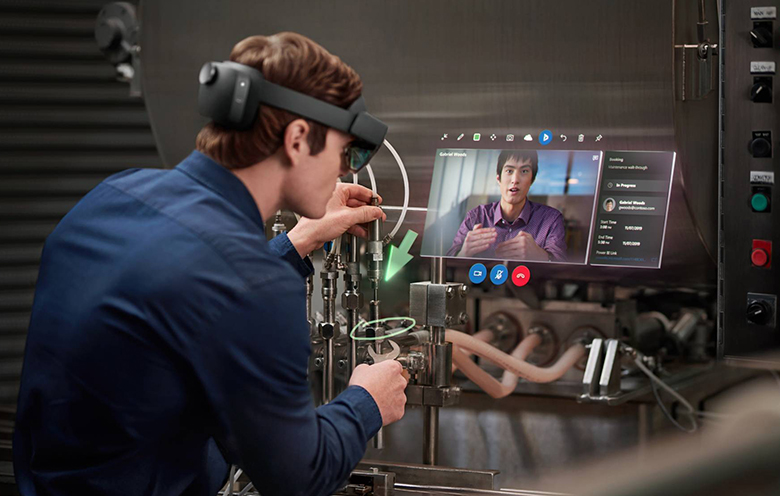
One of the most impactful applications of AR for remote teams is in providing expert assistance to field technicians or frontline workers. Instead of traveling long distances, an expert can guide a remote worker through a complex repair or installation. Using an AR headset or even a smartphone, the expert can see what the technician sees, draw digital instructions directly onto the technician's view of the equipment, highlight components, and overlay crucial information like wiring diagrams or schematics.
This form of remote assistance drastically cuts down travel costs and time, improves first-time fix rates, and ensures knowledge transfer from experienced personnel to less experienced staff. Industries like manufacturing, healthcare, and utilities are already leveraging this for maintenance, diagnostics, and training.
Immersive Virtual Meetings and Training
While not full virtual reality (VR), AR offers a compelling alternative for more engaging meetings than traditional video calls. Imagine a virtual conference room where attendees appear as avatars or even lifelike holograms, allowing for natural eye contact and body language interpretation. Participants can interact with shared digital whiteboards, present 3D data visualizations, and even walk around virtual objects together.
For training, AR provides hands-on, risk-free environments. Trainees can practice complex procedures on virtual machinery, receive real-time feedback, and learn at their own pace without needing physical equipment or a dedicated training facility. This is particularly valuable for high-stakes industries where practical experience is crucial but expensive or dangerous to simulate physically.
Key Benefits of Implementing AR in Remote Collaboration
Adopting augmented reality for remote collaboration offers a multitude of tangible benefits for businesses and their employees:
- Increased Productivity and Efficiency: By enabling immediate visual communication and interaction with digital twins, AR accelerates decision-making, streamlines workflows, and reduces errors. Teams can solve problems faster and iterate designs more rapidly.
- Reduced Travel Costs and Time: The ability to conduct detailed reviews, provide expert support, and conduct training remotely significantly cuts down on business travel expenses and the time associated with it, leading to substantial cost savings.
- Enhanced Communication and Engagement: AR fosters a deeper sense of presence and shared understanding than traditional tools. The ability to point, gesture, and interact with virtual objects together makes communication clearer and more engaging, reducing misinterpretations.
- Improved Knowledge Transfer: Experts can visually guide novices through complex tasks, effectively transferring tacit knowledge that is difficult to convey through words or 2D images alone. This empowers a less experienced workforce and reduces reliance on a few key individuals.
- Greater Flexibility and Accessibility: AR enables global teams to collaborate seamlessly regardless of their physical location, fostering a more inclusive and diverse workforce. It opens up opportunities for talent acquisition beyond geographical boundaries.
- Better Decision-Making: Visualizing complex data and designs in a shared 3D space allows for a more comprehensive understanding of problems and solutions, leading to more informed and accurate decisions.
Challenges and Practical Considerations for AR Adoption
While the promise of augmented reality for remote collaboration is immense, there are practical challenges to consider for successful implementation:
- Hardware Costs: High-quality AR headsets can be expensive, representing a significant upfront investment for organizations. However, the increasing availability of AR capabilities on smartphones and tablets is democratizing access.
- Connectivity Requirements: Robust and reliable internet connectivity is crucial for real-time, low-latency AR experiences, especially when dealing with large 3D models or live video feeds.
- User Adoption and Training: Like any new technology, AR requires a learning curve. Providing adequate training and support is essential to ensure employees feel comfortable and confident using the tools.
- Integration with Existing Systems: Seamless integration of AR platforms with existing enterprise solutions (e.g., CAD software, project management tools, CRM) is vital for a smooth workflow and data consistency. Consider platforms that offer robust APIs and SDKs.
- Data Security and Privacy: As AR systems often deal with sensitive corporate data or real-world environments, robust security protocols and privacy considerations are paramount.
- Ergonomics and Comfort: For prolonged use, the comfort and weight of AR headsets can be a factor. Ongoing advancements are continuously improving device design.
Tips for Successful AR Implementation in Your Organization:
- Start Small, Scale Smart: Begin with a pilot program in a specific department or for a particular use case where AR can demonstrate immediate value (e.g., remote assistance for field service).
- Identify Clear Use Cases: Don't implement AR for the sake of it. Pinpoint specific pain points in your remote collaboration workflows that AR can genuinely solve.
- Choose the Right Hardware and Software: Research different AR devices (headsets vs. mobile AR) and software platforms based on your specific needs, budget, and desired functionalities. Look for enterprise-grade solutions.
- Invest in Training and Support: Provide comprehensive training programs and ongoing technical support to ensure high user adoption rates. Create champions within your team.
- Measure ROI: Track key performance indicators (KPIs) such as reduced travel costs, improved first-time fix rates, faster project completion times, and enhanced team satisfaction to demonstrate the value of your AR investment.
- Prioritize Data Security: Work with IT and cybersecurity teams to ensure all AR applications and data handling comply with industry standards and internal policies.
The Future of Remote Collaboration: Blending Physical and Digital Realities
The trajectory of augmented reality for remote collaboration is one of increasing sophistication and integration. We are moving towards a future where the lines between our physical and digital workspaces become increasingly blurred. Concepts like spatial computing will become commonplace, allowing users to interact with persistent digital content anchored to real-world locations, accessible by anyone with an AR device.
Imagine a future where:
- Persistent Digital Workspaces: Teams can leave digital notes, 3D models, and data visualizations anchored in a specific physical location (e.g., a factory floor or an architectural site), accessible to anyone visiting that location with an AR device.
- Hyper-Realistic Avatars and Holograms: Advancements in volumetric capture and rendering will enable truly lifelike representations of remote colleagues, making virtual interactions feel almost indistinguishable from in-person ones. This would significantly enhance the feeling of holographic presence.
- AI-Powered Assistance: AR systems will integrate with AI to offer proactive assistance, context-aware information, and even predictive analytics during collaborative sessions. For instance, an AI might highlight a potential design flaw in a 3D model before a human notices it.
- Interoperable Platforms: The industry will likely move towards more standardized and interoperable AR platforms, allowing teams to collaborate across different devices and software ecosystems seamlessly.
The continuous innovation in hardware (lighter, more powerful headsets) and software (more intuitive interfaces, robust development tools) will further accelerate the adoption of AR for remote collaboration. As organizations continue to embrace distributed work models, augmented reality will no longer be a novelty but an essential component of the modern virtual workspaces, driving unprecedented levels of connectivity, efficiency, and innovation.
Frequently Asked Questions
What is augmented reality for remote collaboration?
Augmented reality for remote collaboration refers to the use of AR technology to enhance communication and interaction among geographically dispersed teams. It overlays digital information, such as 3D models, annotations, or virtual objects, onto a user's real-world environment, allowing remote team members to share and interact with this digital content as if they were in the same physical space. This enables more immersive meetings, real-time remote assistance, and collaborative design reviews.
How does AR improve productivity for remote teams?
AR significantly improves productivity for remote teams by enabling clearer communication, faster problem-solving, and more efficient workflows. It allows teams to visualize and interact with complex 3D models, provide precise remote assistance with visual overlays, and conduct more engaging virtual meetings. This reduces misunderstandings, accelerates design iterations, minimizes travel, and speeds up decision-making processes, leading to overall enhanced efficiency and output.
What are some common applications of AR in a remote work setting?
Common applications of AR for remote teams include: 1) Remote Assistance: Guiding field technicians or workers through complex tasks with visual overlays. 2) Collaborative Design and Review: Teams viewing and manipulating 3D models of products or structures together. 3) Immersive Training: Providing hands-on, virtual training experiences without physical equipment. 4) Virtual Meetings: Creating more engaging meeting environments with shared digital whiteboards and 3D content. 5) Digital Twin Interaction: Monitoring and interacting with virtual replicas of physical assets from anywhere.
Is augmented reality the same as virtual reality for collaboration?
No, augmented reality (AR) and virtual reality (VR) are distinct, though related, technologies. VR creates a completely immersive, simulated environment that replaces the user's real world, often used for deeply immersive training or virtual meeting spaces. AR, conversely, overlays digital content onto the real world, enhancing it rather than replacing it. For collaboration, AR is often preferred when interaction with the physical environment is still necessary, such as for remote assistance on machinery or collaborative design where the physical context is important, while VR excels at fully simulated team environments.
What kind of hardware is needed for AR remote collaboration?
The hardware needed for augmented reality for remote collaboration varies depending on the application. It can range from readily available devices like smartphones and tablets (which use their cameras to provide AR experiences) to dedicated AR headsets (e.g., Microsoft HoloLens, Magic Leap) that offer a more immersive, hands-free experience. The choice of hardware often depends on the complexity of the task, the required level of immersion, and the budget. Enterprise solutions often leverage headsets for professional use cases.

0 Komentar