
How to Create a Strong and Secure Password: Your Ultimate Guide to Digital Fortification
In an increasingly interconnected world, your digital identity is only as secure as your weakest link: your password. Are you looking to fortify your online defenses and safeguard your personal information from ever-present cyber threats? This comprehensive guide will equip you with the essential knowledge and actionable strategies on how to create a strong and secure password, transforming your vulnerable credentials into an impenetrable digital fortress. We'll delve deep into the principles of robust password creation, explore cutting-edge techniques, and reveal the secrets to maintaining superior password hygiene, ensuring your online accounts remain protected against sophisticated attacks and data breaches.
Why Password Strength Matters More Than Ever
In the digital age, a weak password is an open invitation for cybercriminals. Every day, millions of login attempts are made against personal and corporate accounts, often utilizing automated tools and massive databases of compromised credentials. The consequences of a successful breach can range from minor inconvenience to catastrophic financial loss and identity theft. Understanding the underlying risks underscores the critical importance of crafting a truly strong and secure password.
Data breaches are a constant threat, with high-profile incidents regularly exposing billions of user records. When your password is weak or reused across multiple sites, a single breach can compromise your entire digital life. Attackers employ various methods, including brute-force attacks, where they systematically try every possible combination, and dictionary attacks, which leverage common words and phrases. A strong password significantly increases the computational effort required for these attacks, often making them economically unfeasible for the attacker.
Beyond direct attacks, your digital safety is also threatened by phishing scams and social engineering tactics designed to trick you into revealing your credentials. Even if you don't fall for these, a weak password can be guessed by someone who knows basic details about you. Prioritizing cybersecurity begins with the foundation: a robust, unique password for every online service.
The Core Principles of a Truly Strong Password
Creating a truly resilient password isn't just about adding a special character or two. It involves understanding and applying several fundamental principles that collectively make your credentials incredibly difficult to crack. These principles form the bedrock of effective account protection.
Length is King: The Power of Extended Credentials
Perhaps the most crucial factor in password strength is its length. A longer password dramatically increases the number of possible combinations, making it exponentially harder for attackers to guess or crack using computational power. While many services recommend a minimum of 8 characters, modern cybersecurity experts advocate for passwords of 12 characters or more, with 16 or even 20 characters being ideal. Think of it this way: adding just one more character to a password can multiply the time it takes to crack it by millions or even billions of times, depending on the character set used.
- Exponential Growth: Each additional character adds a new dimension of complexity.
- Time vs. Computation: Longer passwords push cracking times beyond practical limits for most attackers.
- Industry Best Practice: Aim for 12+ characters as a baseline for critical accounts.
Diversity of Characters: Mixing It Up for Maximum Security
A strong password isn't just long; it's also diverse. This means incorporating a mix of different character types. Relying solely on lowercase letters or numbers makes a password relatively easy to guess. A truly secure password should combine:
- Uppercase letters (A-Z)
- Lowercase letters (a-z)
- Numbers (0-9)
- Special characters (!@#$%^&()_+-=[]{}|;':",./<>?)
This blend maximizes the character set available to the password, significantly expanding the pool of potential combinations an attacker would need to try. For instance, an 8-character password using only lowercase letters has far fewer possibilities than an 8-character password using all four character types. This principle is vital for creating random characters that defy common patterns.
Unpredictability and Randomness: Ditching the Obvious
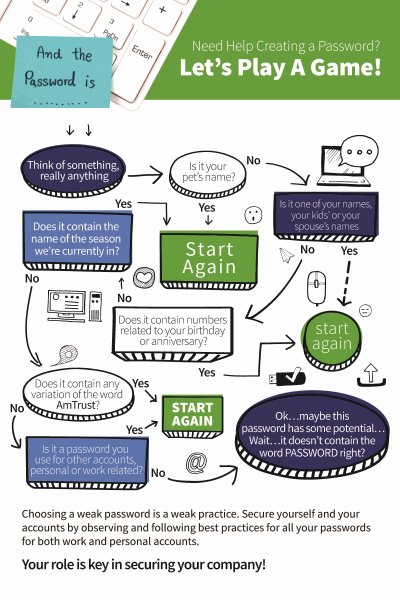
The human brain is wired to find patterns, which unfortunately works against us when creating passwords. Many people use easily guessable information like birthdays, pet names, common words, or sequential numbers. Attackers know this and use sophisticated dictionaries and algorithms that test these common patterns first.
A truly strong password must be unpredictable and appear random. It should have no discernible connection to your personal life, common phrases, or keyboard patterns (e.g., "qwerty", "123456"). Avoid:
- Your name, family names, pet names
- Birthdays, anniversaries, or other significant dates
- Common dictionary words or simple word combinations
- Sequential numbers or letters (e.g., "abcde", "12345")
- Keyboard patterns (e.g., "qazwsx", "asdfgh")
Embrace genuine randomness. Think of a password as a unique, nonsensical string of characters that only you (or your password manager) know.
Uniqueness Across Accounts: The Golden Rule of Online Safety
This is arguably the most overlooked yet critical aspect of online privacy and security. Many users reuse the same password, or slight variations of it, across multiple online accounts. This practice is extremely dangerous. If one service you use suffers a data breach and your reused password is leaked, cybercriminals can then use that credential to attempt to log into all your other accounts – email, banking, social media, shopping sites – in what's known as credential stuffing.
Each online account should have a completely unique and distinct password. This creates a strong barrier, ensuring that a compromise on one platform does not lead to a domino effect across your entire digital presence. While this might seem daunting, especially with dozens of online services, modern tools make this manageable.
Practical Strategies for Crafting Impenetrable Passwords
Now that we understand the principles, let's explore practical, actionable methods to create passwords that embody these security best practices.
The Passphrase Method: Memorable Yet Secure
One of the most effective strategies for creating a strong, memorable, and secure password is the passphrase method. Instead of a single word, you combine several unrelated words to form a long, complex phrase. This method inherently provides length and can be surprisingly easy to remember.
How to do it:
- Choose four or more completely random, unrelated words. (e.g., "purple," "stapler," "cloud," "whisper").
- Combine them into a single string.
- Optionally, add numbers, special characters, or vary capitalization within the phrase for extra complexity.
Examples:
- Simple Passphrase:
purpleStaplerCloudWhisper(16 characters) - Enhanced Passphrase:
Purple$t@plerCl0udWh!sp3r(20 characters – much stronger!) - Another example:
correctHorseBatteryStaple(a famous XKCD comic example, though now widely known, the principle holds for unique phrases).
The key is the randomness of the words and the length. A passphrase of 15-20 characters that combines words and adds some complexity can be far more secure than an 8-character complex password.
Leveraging Random Character Generation
For accounts where memorability isn't a top priority (because you'll use a password manager), generating truly random strings of characters is the gold standard. Many password managers (discussed below) offer built-in generators that can create highly complex, long passwords meeting all diversity criteria.
Characteristics of a generated password:
- Typically 16-30+ characters long.
- Contains a mix of uppercase, lowercase, numbers, and special characters.
- Completely random and nonsensical.
This method ensures the highest level of unpredictability and is ideal for maximizing your online protection.
The Role of Password Managers: Your Digital Security Vault
Managing dozens of unique, complex passwords manually is nearly impossible. This is where a reputable password manager becomes an indispensable tool for your digital security strategy. A password manager is an encrypted digital vault that stores all your login credentials securely.
Benefits of using a password manager:
- Generates Strong Passwords: Most managers have built-in generators for creating unique, random, and highly secure passwords.
- Secure Storage: Your passwords are encrypted and stored safely, accessible only with a single master password (which must be extremely strong and unique).
- Auto-fill Functionality: They can automatically fill in your login details, saving you time and preventing phishing by only filling credentials on legitimate sites.
- Cross-device Sync: Access your passwords from any device.
- Security Audits: Many offer features to identify weak, reused, or compromised passwords.
Popular and reputable password managers include LastPass, 1Password, Bitwarden, and Dashlane. Investing in one is perhaps the single most impactful step you can take to elevate your account protection.
Call to Action: Explore a reputable password manager today and take the first step towards effortless secure login credentials management. Find the right password manager for you.
Beyond Password Creation: Enhancing Your Digital Fortress
While creating strong passwords is foundational, it's just one piece of the cybersecurity puzzle. True digital safety involves layering multiple defenses.
Embracing Multi-Factor Authentication (MFA/2FA)
Even the strongest password can theoretically be compromised. This is why multi-factor authentication (MFA), often called two-factor authentication (2FA), is non-negotiable for critical accounts. MFA adds an extra layer of security beyond just your password.
How MFA works: After entering your password, you're required to provide a second piece of evidence to verify your identity. This could be:
- A code sent to your phone via SMS.
- A code generated by an authenticator app (e.g., Google Authenticator, Authy).
- A biometric scan (fingerprint, facial recognition).
- A physical security key (e.g., YubiKey).
Even if an attacker somehow obtains your password, they cannot access your account without this second factor. Enable MFA on every service that offers it, especially email, banking, social media, and cloud storage.
Regular Password Audits and Updates
Your passwords aren't static; they should evolve. Periodically, you should audit your passwords for strength and uniqueness. Many password managers offer this feature, flagging weak or reused passwords. It's also wise to change passwords for critical accounts (like your primary email) every 6-12 months, or immediately if there's any suspicion of compromise or a major data breach involving a service you use. This practice is part of good password hygiene.
Beware of Phishing and Social Engineering
The human element remains the weakest link in security. Cybercriminals frequently employ phishing, sending deceptive emails or messages that appear legitimate, to trick you into revealing your login credentials. Always be suspicious of unsolicited requests for personal information or links that prompt you to log in. Verify the sender and the URL before clicking or entering any details. No legitimate service will ask for your password via email.
Understanding Credential Stuffing
As mentioned earlier, credential stuffing is a widespread automated attack where attackers use lists of username/password combinations leaked from one data breach to attempt logins on other popular websites. This is precisely why unique passwords for every site are paramount. If you reuse passwords, you are highly vulnerable to this type of attack, even if the service you are trying to access has never been breached directly.
Common Password Mistakes to Avoid
To truly master how to create a strong and secure password, it's equally important to know what NOT to do.
- Reusing Passwords Across Multiple Accounts: This is the cardinal sin of password security. A single breach can compromise your entire digital life. Always use unique passwords.
- Using Personal Information: Names, birthdays, pet names, street addresses, phone numbers, or any easily discoverable personal data should never be part of your password.
- Simple Substitutions: Replacing "o" with "0" or "s" with "$" is easily predictable by modern cracking tools. While adding complexity, it's not a substitute for true randomness and length.
- Writing Passwords Down Insecurely: Post-it notes on your monitor, notes on your phone, or unencrypted text files are all major security risks. Use a reputable password manager instead.
- Sharing Passwords: Never share your passwords with anyone, for any reason. If someone needs access to an account, use secure sharing features within password managers or set up delegated access if available.
- Using Default Passwords: Many devices and services come with default passwords (e.g., "admin," "password"). Always change these immediately upon setup.
Frequently Asked Questions About Secure Passwords
What makes a password "strong" and "secure"?
A strong and secure password is primarily characterized by its length, complexity, and uniqueness. It should be at least 12-16 characters long, incorporate a mix of uppercase and lowercase letters, numbers, and special characters, and be completely unpredictable and unique to each online account. The longer and more random it is, the harder it is for cybercriminals to guess or crack using automated tools like brute-force attacks. This combination provides robust encryption for your login credentials.
Is it better to have a long passphrase or a short, complex password?
In most cases, a long passphrase is significantly more secure than a short, complex password, even if the latter includes many special characters. The reason lies in entropy (the measure of randomness). Each additional character in a password exponentially increases the number of possible combinations. A 16-character passphrase composed of random words, even without special characters, often has higher entropy and is much harder to guess than an 8-character password with mixed character types. The passphrase also has the added benefit of often being easier for humans to remember, striking a balance between memorability and strong authentication.
Should I change my passwords regularly, even if there's no breach?
While the traditional advice was to change passwords every few months, modern cybersecurity recommendations have evolved. For most accounts, if you're using a unique, strong password in conjunction with multi-factor authentication and a reputable password manager, frequent, forced password changes are less critical and can even lead to users choosing weaker, more memorable patterns. However, you should absolutely change passwords immediately if a service you use reports a data breach, if you suspect your account has been compromised, or for your most critical accounts (like primary email or banking) every 6-12 months as a proactive measure. Regularly auditing your passwords for strength and uniqueness using your password manager is a more effective strategy for maintaining good password hygiene.
Can a password manager be hacked? How safe are they?
Reputable password managers are designed with advanced encryption and security protocols, making them extremely difficult targets to hack directly. Your vault is encrypted with a master password that only you know, meaning even the password manager company cannot access your stored credentials. While no system is 100% impervious, the risk of a password manager being hacked and your individual vault compromised is significantly lower than the risk of using weak, reused passwords across multiple sites. The biggest vulnerability often lies with the user's master password (which must be exceptionally strong and unique) or falling victim to phishing attacks that trick them into revealing their master password. When used correctly, a password manager is one of the most effective tools for enhancing your overall digital security and simplifying the creation of robust password credentials.

0 Komentar