
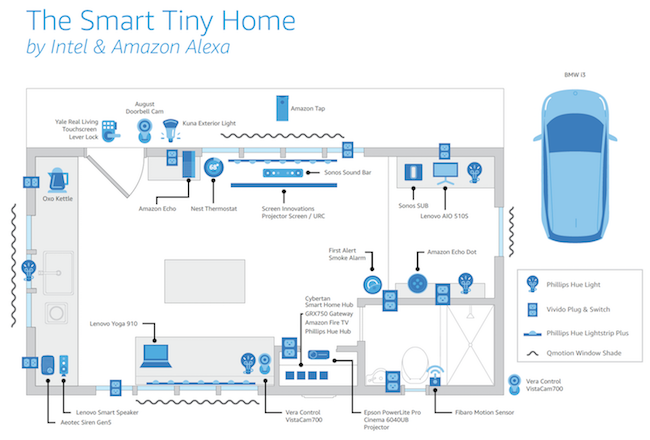
How to Set Up a Smart Home with Alexa: Your Ultimate Guide to Intelligent Living
Embarking on the journey to transform your living space into an intelligent, voice-controlled environment is an exciting prospect. This comprehensive guide will walk you through exactly how to set up a smart home with Alexa, ensuring a seamless and intuitive experience. Discover the power of voice control, automate daily tasks, and enhance your home's comfort, security, and energy efficiency. Whether you're a beginner or looking to expand an existing setup, this detailed resource provides actionable steps, expert tips, and everything you need to create a truly connected home ecosystem.
Why Choose Alexa for Your Smart Home Ecosystem?
Amazon's Alexa, powered by its popular line of Amazon Echo devices, has become synonymous with accessible and powerful home automation. Its widespread adoption stems from several key advantages that make it an ideal central hub for your intelligent living space. Firstly, Alexa boasts unparalleled device compatibility, supporting thousands of smart home products from various manufacturers. This open ecosystem means you're not locked into a single brand, offering immense flexibility when choosing your smart home devices.
Secondly, the intuitive nature of Alexa's voice control is a game-changer. Issuing commands in natural language to adjust lighting, control thermostats, or play music feels incredibly futuristic yet effortlessly simple. This hands-free operation is particularly beneficial for accessibility and convenience. Furthermore, Alexa's ability to create custom Alexa routines allows for complex sequences of actions triggered by a single command, time of day, or even sensor input, truly bringing your home to life.
Finally, the continuous evolution of Alexa's features, including new skills, enhanced AI capabilities, and integrations with services like music streaming and news, means your smart home grows smarter over time. The robust support community and extensive online resources also make troubleshooting and learning new tricks straightforward, solidifying Alexa's position as a leading digital assistant for the modern home.
Getting Started: The Foundation of Your Alexa Smart Home
Before diving into specific devices, laying a solid foundation is crucial. This involves choosing the right central Alexa device and understanding the core control mechanism.
Choosing Your Amazon Echo Device
The heart of your Alexa-powered smart home is an Amazon Echo device. There's a wide range to choose from, each offering distinct features:
- Echo Dot: The most affordable and compact option, perfect for adding Alexa to multiple rooms or for those new to smart homes. It provides excellent voice control and smart home capabilities.
- Echo: The standard Echo offers improved audio quality compared to the Dot, making it a better choice for music playback while still functioning as a robust smart home hub.
- Echo Show: Featuring a display, the Echo Show series adds visual feedback, video calls, security camera feeds, and smart display functionality. Ideal for kitchens or areas where visual information is helpful.
- Echo Studio: For audiophiles, the Echo Studio delivers premium, immersive sound quality, while still retaining all smart home functionalities.
- Echo Pop: A stylish, compact option similar to the Dot but with a directional speaker, great for smaller spaces.
Consider your primary use case – audio quality, visual display, or just basic voice commands – when selecting your initial Echo device. For larger homes, a combination of different Echo models often works best to ensure complete coverage for voice control.
Initial Setup of Your Echo Device
- Plug it in: Connect your Echo device to power. It will usually light up and greet you.
- Download the Alexa App: On your smartphone or tablet, download the Amazon Alexa app from your device's app store (iOS or Android).
- Log In: Open the app and log in with your Amazon account credentials. If you don't have one, you'll need to create one.
- Add Device: In the Alexa app, tap the "More" tab, then "Add a Device." Select "Amazon Echo" and follow the on-screen prompts.
- Connect to Wi-Fi: The app will guide you through connecting your Echo to your home Wi-Fi network. Ensure you have your Wi-Fi password ready.
- Select Location: Assign your Echo to a specific room (e.g., "Living Room," "Kitchen"). This is crucial for grouping devices later.
- Personalization: Follow any additional prompts for personalization, such as setting your preferred music service or enabling skills.
Once set up, your Echo device is ready to receive commands and become the central brain of your voice-activated smart home.
Essential Smart Home Devices for Alexa Integration
The true power of an Alexa smart home lies in the diverse range of compatible smart home devices. Here are some categories to consider for your initial setup:
Smart Lighting: Setting the Mood
One of the most popular starting points is smart lighting. Devices like Philips Hue, Govee, or Sengled smart bulbs allow you to control brightness, color, and on/off status with your voice or through the Alexa app. You can create different lighting scenes for various activities – "Movie Night," "Reading," or "Relaxation." Smart light switches are also an option for controlling existing non-smart fixtures.
Smart Plugs: Making Anything "Smart"
For traditional appliances that aren't inherently smart, smart plugs are incredibly versatile. Plug in a lamp, a coffee maker, or even holiday lights, and instantly gain voice control over them. This is an inexpensive way to expand your smart home capabilities without replacing existing electronics. Look for brands like TP-Link Kasa, Amazon Smart Plug, or Wyze Plug.
Smart Thermostats: Optimizing Comfort and Energy
A smart thermostat like Ecobee or Nest (with Alexa integration) allows you to control your home's temperature from anywhere, schedule climate changes, and even learn your preferences over time. This not only enhances comfort but can also lead to significant energy savings, making it a smart investment for any connected home ecosystem.
Smart Locks and Security Cameras: Enhancing Home Security
For peace of mind, integrating smart locks (e.g., August, Schlage Encode) and security cameras (e.g., Ring, Arlo, Blink) with Alexa is highly recommended. You can check if doors are locked, view live camera feeds on an Echo Show, or receive motion alerts. These devices provide robust home monitoring and control, adding a crucial layer of safety to your intelligent living space.
Other Useful Smart Devices
- Robot Vacuums: Brands like Roomba and Roborock can be commanded to clean via Alexa.
- Smart Doorbells: Ring and Nest doorbells integrate seamlessly, allowing you to see and speak to visitors.
- Smart Blinds/Curtains: Automate window coverings for privacy and light control.
- Smart Speakers (multi-room audio): Expand your audio experience with multiple Echo devices for whole-home music.
Step-by-Step Guide: Connecting Your Devices to Alexa
Once you have your chosen smart home devices, connecting them to Alexa is usually a straightforward process. The key is often to set up the device with its own manufacturer's app first.
- Install Manufacturer's App (if applicable): Many smart devices require you to download their specific app (e.g., Philips Hue app, TP-Link Kasa app) and set up the device within that app first. This typically involves connecting the device to your home Wi-Fi network and ensuring it's fully functional independently.
- Enable the Alexa Skill: For most third-party devices, you'll need to enable an Alexa "Skill." In the Alexa app, go to "More" > "Skills & Games." Search for the brand of your device (e.g., "Philips Hue," "Kasa," "Ring"). Tap "Enable to Use" and link your manufacturer's account when prompted. This grants Alexa permission to control your devices.
- Discover Devices in Alexa: After enabling the skill, tell your Echo device, "Alexa, discover my devices," or manually initiate discovery in the Alexa app by going to "Devices" > "+" icon > "Add Device." Alexa will then search for and connect to your newly added smart devices.
- Assign to Rooms: Once discovered, assign each device to a specific room (e.g., "Living Room Lamp," "Kitchen Thermostat"). This is vital for intuitive voice control (e.g., "Alexa, turn on the living room lights").
- Test Commands: Test your setup with simple voice commands like, "Alexa, turn on the bedroom light," or "Alexa, set the thermostat to 72 degrees."
Troubleshooting Common Connection Issues
- Wi-Fi Connectivity: Ensure your devices are on the same Wi-Fi network (2.4 GHz is often preferred for smart devices). Check your router's signal strength.
- Skill Enabled: Double-check that the correct Alexa skill for your device's brand is enabled and linked.
- Power Cycle: Try unplugging and replugging both your smart device and your Echo device.
- Factory Reset: As a last resort, consult your device's manual for instructions on how to factory reset it and then try the setup process again.
- Device Compatibility: Always verify that your chosen smart home devices are indeed "Works with Alexa" certified to avoid compatibility headaches.
Unlocking Automation: Creating Alexa Routines
One of the most powerful features of an Alexa-powered smart home is the ability to create Alexa routines. Routines allow you to automate multiple actions with a single voice command, a specific time, or even a sensor trigger. This elevates your home from merely "smart" to truly "automated."
What are Routines and How Do They Work?
An Alexa Routine consists of three main components:
- When: The trigger that starts the routine (e.g., "Alexa, good morning," a specific time like 7:00 AM, motion detected by a sensor, or opening a door).
- Add Action: The tasks Alexa performs (e.g., turn on lights, adjust thermostat, play music, announce the weather, send a notification).
- From: The device that performs the action (e.g., a specific Echo speaker, all smart lights).
Examples of Useful Alexa Routines
- Morning Routine:
- When: "Alexa, good morning."
- Action: Turn on bedroom lights to 50%, start the coffee maker (via smart plug), play morning news, announce today's weather.
- Leaving Home Routine:
- When: "Alexa, I'm leaving."
- Action: Turn off all lights, set thermostat to away mode, lock smart doors, arm security system.
- Movie Night Routine:
- When: "Alexa, movie night."
- Action: Dim living room lights, turn on smart TV, lower smart blinds.
- Bedtime Routine:
- When: "Alexa, good night." (or scheduled for 10:00 PM)
- Action: Turn off all lights downstairs, activate white noise machine, lock front door, set thermostat to sleep temperature.
Creating a Routine in the Alexa App
- Open the Alexa app.
- Tap the "More" tab at the bottom right.
- Tap "Routines."
- Tap the "+" icon in the top right corner to create a new routine.
- Enter Routine Name: Give your routine a descriptive name (e.g., "Morning Wakeup").
- Add "When": Choose your trigger:
- "Voice": Specify the phrase (e.g., "Good Morning").
- "Schedule": Set a time and days of the week.
- "Smart Home": Trigger based on a device's state (e.g., motion sensor activated).
- Add "Action": Tap "Add action" and choose from categories like:
- "Smart Home": Control lights, plugs, thermostats, etc.
- "Alexa Says": Have Alexa speak a custom phrase.
- "Music & Podcasts": Play specific audio.
- "News," "Weather," "Calendar," etc.
- Choose "From": Select which Echo device should execute the routine (if applicable).
- Save: Tap "Save" to activate your new routine.
Experiment with different triggers and actions to build an automated home that truly caters to your lifestyle. The possibilities with Alexa routines are vast, making your home more convenient and efficient.
Optimizing Your Smart Home Experience
Setting up your devices and routines is just the beginning. To truly master your Alexa smart home, consider these optimization tips.
Grouping Devices for Seamless Control
Grouping devices allows you to control multiple devices with a single command. For instance, creating a "Living Room" group allows you to say, "Alexa, turn on the living room lights," and all lights assigned to that group will activate. To create groups:
- In the Alexa app, go to "Devices."
- Tap the "+" icon in the top right corner.
- Select "Add Group."
- Choose "Room" and select the devices you want to include (e.g., all smart lights and smart plugs in your living room).
Mastering Voice Commands
While basic commands are straightforward, mastering more specific or nuanced commands can enhance your voice control experience:
- Be Specific: Instead of "turn on the light," try "turn on the kitchen light."
- Use Percentages: "Set the living room lights to 50 percent."
- Adjust Temperature: "Set the thermostat to 72 degrees," or "raise the temperature by 2 degrees."
- Check Status: "Is the front door locked?" or "What's the temperature in the bedroom?"
- Combine Actions (via Routines): As discussed, routines allow you to bundle multiple commands into one phrase.
Privacy and Security Considerations
As your home becomes more connected, prioritizing privacy and security is paramount:
- Strong Passwords: Use unique, strong passwords for your Amazon account and all smart device manufacturer accounts.
- Two-Factor Authentication (2FA): Enable 2FA for your Amazon account to add an extra layer of security.
- Review Permissions: Regularly review the permissions granted to Alexa skills in the Alexa app. Disable any skills you no longer use.
- Microphone Button: All Echo devices have a physical microphone mute button. Use it when you want to ensure Alexa isn't listening.
- Delete Voice Recordings: You can review and delete your voice recordings from the Alexa app (Settings > Alexa Privacy > Review Voice History).
- Secure Wi-Fi: Ensure your home Wi-Fi network is secure with a strong password (WPA2/WPA3 encryption).
Troubleshooting and Maintenance
Even in a well-oiled smart home, occasional issues can arise:
- "Device is unresponsive": Check the device's power, Wi-Fi connection, and ensure its manufacturer's app shows it as online.
- Wi-Fi Issues: A weak Wi-Fi signal is a common culprit. Consider Wi-Fi extenders or a mesh network for larger homes.
- Routine Not Triggering: Verify the routine's "When" condition and that all included devices are online.
- Firmware Updates: Ensure all your smart devices and Echo devices have the latest firmware. Alexa devices update automatically, but third-party devices may require manual updates via their respective apps.
Frequently Asked Questions
What is the most important device to start with when setting up a smart home with Alexa?
The absolute most important device to start with is an Amazon Echo device. This serves as the central hub and allows you to interact with Alexa using voice control. Once you have an Echo, you can then gradually add other smart home devices like smart plugs or smart lighting based on your immediate needs and budget. A basic Echo Dot is an excellent and affordable starting point to experience the core functionalities of an Alexa-powered home.
Can I control my smart home devices when I'm not at home?
Yes, absolutely! One of the significant advantages of setting up a smart home with Alexa is the ability to control your devices remotely. As long as your Echo device and smart devices are connected to the internet, you can use the Alexa app on your smartphone from anywhere in the world to manage lights, adjust your smart thermostat, check security cameras, or even activate Alexa routines. This remote access provides convenience and peace of mind.
Are all smart home devices compatible with Alexa?
While Alexa boasts extensive device compatibility, not all smart home devices are directly compatible. Look for products clearly labeled "Works with Alexa" or "Alexa Built-in." Most major brands like Philips Hue, Ring, Kasa, Ecobee, and August offer seamless integration. If a device doesn't have direct Alexa support, it might still be controllable via third-party services like IFTTT (If This Then That), which acts as a bridge, though direct integration is always preferred for simplicity and reliability in your home automation setup.
How many smart devices can I connect to my Alexa smart home?
Amazon states that an Alexa account can support up to 200 devices, and a single Echo device can typically handle connections for a large number of smart devices, often hundreds, depending on the specific device and network conditions. The limiting factor is usually your home Wi-Fi network's capacity and stability, rather than Alexa itself. For very large smart homes, consider upgrading to a robust mesh Wi-Fi system to ensure consistent performance for all your smart home devices and reliable voice control.
What are some common mistakes to avoid when setting up an Alexa smart home?
A common mistake is not planning your setup. Start small, understand how devices work, and then expand. Another error is neglecting Wi-Fi strength; a weak network will lead to unresponsive devices. Not assigning devices to rooms or groups makes voice control cumbersome. Lastly, forgetting about privacy settings and not regularly reviewing permissions can compromise your security. Always ensure your digital assistant is configured to your comfort level regarding data collection.

0 Komentar