
Mastering Password Security: How to Create a Strong and Unique Password for Ultimate Online Safety
In today's hyper-connected world, your digital life is increasingly intertwined with your real life. From banking and social media to email and online shopping, virtually every interaction relies on a simple yet critical component: your password. But are your passwords truly robust enough to protect your sensitive data? Learning how to create a strong and unique password is no longer just good practice; it's an essential skill for safeguarding your online identity and preventing devastating cyberattacks. This comprehensive guide, crafted by an SEO expert with deep knowledge of cybersecurity best practices, will equip you with the strategies and insights needed to fortify your digital defenses, ensuring unparalleled data protection and peace of mind.
The Foundation of Digital Defense: Why Strong Passwords Matter More Than Ever
In the vast landscape of the internet, your passwords serve as the primary lock on your personal information. A weak or easily guessable password is an open invitation for malicious actors, leading to severe consequences such as identity theft, financial fraud, and privacy breaches. The sheer volume of data breaches reported annually underscores the urgent need for robust password hygiene. Cybercriminals constantly evolve their tactics, employing sophisticated methods like brute-force attacks, where they systematically try countless combinations, and dictionary attacks, which leverage common words and phrases.
Moreover, the rise of large-scale data leaks means that even if you've never been directly targeted, your old, reused passwords might already be circulating on the dark web. When one service you use suffers a breach, and you've recycled that same password for multiple accounts, hackers can easily gain access to all of them – a cascade effect known as "credential stuffing." This highlights why understanding digital security fundamentals and implementing unique password strategies is paramount for every online user. Protecting your digital footprint begins with a strong, impenetrable barrier at every login.
Common Vulnerabilities Exploited by Cybercriminals
- Reused Passwords: The single biggest risk. If one account is compromised, all accounts using that same password are at risk.
- Predictable Patterns: Using sequential numbers (123456), keyboard patterns (qwerty), or simple repetitions.
- Personal Information: Birthdays, pet names, family names, or easily discoverable details. These are often the first guesses in a targeted attack.
- Dictionary Words: Common words or phrases found in a dictionary, which are easily cracked by automated tools.
- Short Length: Passwords that are too short offer fewer combinations, making them easier to guess through brute-force methods.
Beyond Basic: Principles of a Truly Strong Password
Creating a strong password isn't just about adding a number or a symbol. It involves a strategic combination of elements that make it incredibly difficult for humans or machines to guess or crack. Think of it as crafting a complex cryptographic key rather than just a simple lock combination.
Length is Might: The Power of Many Characters
The longer your password, the exponentially more difficult it is to crack. While some services enforce a minimum of 8 characters, this is often insufficient. Security experts now recommend a minimum length of 12 to 16 characters for personal accounts, and even longer for highly sensitive accounts like primary email or banking. Each additional character dramatically increases the number of possible combinations, making brute-force attacks practically unfeasible within a reasonable timeframe. For instance, an 8-character password might be cracked in hours, while a 16-character one could take millions of years.
Diversity is Key: A Mix of Character Types
A truly strong password incorporates a variety of character types: uppercase letters (A-Z), lowercase letters (a-z), numbers (0-9), and special characters (e.g., !, @, #, $, %, ^, &, ). This diversity significantly expands the character set from which the password is drawn, making it far more resistant to dictionary and brute-force attacks. Avoid predictable substitutions like "pa$$w0rd" for "password" – modern cracking tools are designed to recognize these common patterns.
Unpredictability Rules: Breaking the Mold
Your password should be completely unpredictable. This means avoiding anything related to your personal life, common phrases, or easily identifiable patterns. Think random. Even if you incorporate length and diversity, a password like "MyDogFido123!" is inherently weaker than a truly random string because parts of it are guessable. The best passwords are those that make no sense to anyone but you (or rather, no sense at all).
Uniqueness for Every Account: The Golden Rule of Password Security
This cannot be stressed enough: every single online account should have a unique password. This is the most crucial rule for preventing widespread compromise during a data breach. If a hacker gains access to one of your accounts, a unique password ensures that they cannot use those same credentials to access your email, banking, social media, or other critical services. This principle is fundamental to protecting your overall online safety and limiting the damage from any single point of failure.
Actionable Strategies to Create Unbreakable Passwords
Now that we understand the core principles, let's explore practical methods for creating passwords that are both strong and manageable.
The Passphrase Method: Remembering Complexity
One of the most effective ways to create a strong, memorable password is to use a passphrase. A passphrase is a sequence of several unrelated words, often combined with numbers and symbols, making it long and complex while still being relatively easy for you to recall. The key is to pick words that are not logically connected or form a common idiom.
- How to do it:
- Choose three to five completely unrelated words (e.g., "blue," "banana," "tree," "whisper").
- Combine them, perhaps adding spaces, numbers, or symbols.
- Introduce some complexity by capitalizing letters, adding numbers, or incorporating special characters.
- Example: Instead of "BlueBananaTreeWhisper," try "BlueBananaTree@78!whisper". This is long, diverse, and much harder to guess than "MySecretPassword123."
- Benefit: High entropy (randomness) due to length, yet relatively easy to remember.
Acronym Method: Clever Mnemonics for Secure Credentials
Another popular technique involves creating an acronym from a memorable sentence or phrase. This method combines the benefits of length and diversity while leveraging your memory for a phrase.
- How to do it:
- Think of a long, unique sentence that's easy for you to remember (e.g., "My dog, Fido, loves chasing squirrels in the park!").
- Take the first letter of each word and combine them.
- Add numbers, symbols, and capitalize some letters in a consistent pattern.
- Example: From "My dog, Fido, loves chasing squirrels in the park!", you could get "MdF,lc$itp!2023".
- Benefit: Creates a complex password that's tied to a personal, easy-to-recall mnemonic.
Random Generation with Purpose: Let Technology Do the Work
For ultimate strength and unpredictability, truly random passwords are unbeatable. These are strings of characters that have no discernible pattern or meaning. While difficult to memorize, they are incredibly secure and best used in conjunction with a password manager.
- How to do it:
- Utilize the built-in password generator of a reputable password manager (discussed below).
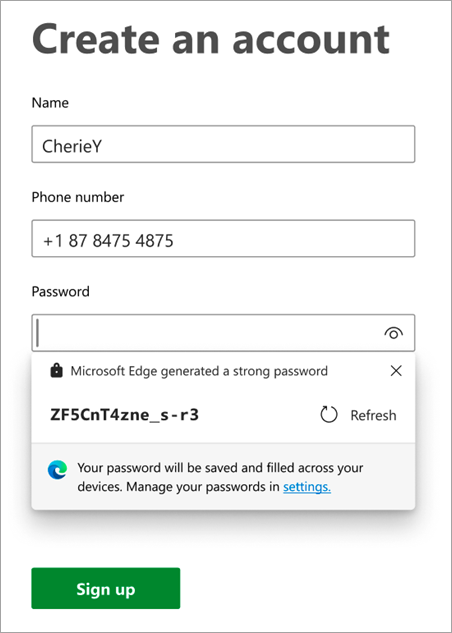
- Most modern web browsers also offer strong password suggestions when creating new accounts.
- Ensure the generator allows you to specify length and character types (uppercase, lowercase, numbers, symbols).
- Example: "kP9$jWq!2sX&rL7^tYm@pQ" – impossible to guess.
- Benefit: Provides the highest level of encryption strength and resistance to all forms of guessing attacks.
Leveraging Password Managers: Your Digital Vault
For most users, the most practical and secure approach to managing numerous unique, strong passwords is to use a dedicated password manager. These applications act as encrypted digital vaults, storing all your login credentials securely behind one master password.
- Key Benefits:
- Strong Password Generation: They can automatically generate long, complex, and truly random passwords for all your new accounts.
- Secure Storage: All your passwords are encrypted and stored locally or in the cloud, accessible only with your master password.
- Auto-fill Functionality: They can automatically fill in login details for websites and apps, saving you time and preventing typing errors.
- Breach Monitoring: Many managers alert you if any of your stored passwords have been found in a data breach, prompting you to change them.
- Cross-Device Sync: Access your passwords securely across all your devices.
- Popular Options: Reputable services include LastPass, 1Password, Bitwarden, Dashlane, and Keeper. Do your research to choose a reliable password manager that fits your needs.
- Actionable Tip: Once you've chosen a password manager, the master password for that manager becomes the single most important password you have. Make it exceptionally long, complex, and unique, and memorize it thoroughly.
Elevating Your Password Security Posture
Creating strong passwords is a crucial first step, but it's part of a broader cybersecurity strategy. To truly fortify your online accounts, you must integrate other layers of protection.
The Power of Multi-Factor Authentication (MFA)
Even the strongest password can theoretically be compromised. This is where Multi-Factor Authentication (MFA), also known as Two-Factor Authentication (2FA), comes in. MFA adds an additional layer of security by requiring a second form of verification beyond just your password.
- How MFA Works: It typically requires "something you know" (your password) combined with "something you have" (a code from your phone, a physical security key) or "something you are" (biometrics like a fingerprint or face scan).
- Types of MFA:
- Authenticator Apps: (e.g., Google Authenticator, Authy) generate time-based codes, generally more secure than SMS.
- Hardware Security Keys: (e.g., YubiKey) physical devices that plug into your computer or phone, offering the highest level of security.
- SMS Codes: While better than nothing, SMS codes can be vulnerable to SIM-swapping attacks. Use authenticator apps or hardware keys if available.
- Call to Action: Enable MFA on every single account that offers it, especially for email, banking, and social media. It's the single most effective way to prevent unauthorized access, even if your password is stolen.
Regular Password Audits and Updates
While the old advice of changing passwords every 90 days has evolved (especially if you're using unique, complex passwords and a password manager), regular audits are still crucial. You should immediately change a password if:
- You receive a breach notification from a service you use.
- You suspect your account has been compromised or notice unusual activity.
- You've used a password on a public or untrusted computer.
- Your password manager flags a password as weak or compromised.
A good password manager can help you conduct these audits effortlessly, identifying weak, reused, or compromised passwords across all your accounts, ensuring proactive secure credential management.
Vigilance Against Phishing and Social Engineering
Even the most sophisticated technical safeguards can be bypassed by human error. Phishing scams and other social engineering tactics aim to trick you into revealing your passwords or other sensitive information directly. Be extremely cautious of unsolicited emails, texts, or calls asking for your login details, even if they appear to be from a legitimate source. Always verify the sender and the legitimacy of the request independently. Learn to recognize phishing attempts to protect your online identity.
Securing Your Recovery Options
Often overlooked, your password recovery options (e.g., security questions, backup email addresses, phone numbers) can be a weak link. Ensure your security questions have answers that are not publicly discoverable. If possible, opt for recovery methods that don't rely on easily guessed information. Your backup email account should also have a unique, strong password and MFA enabled, as it often holds the keys to resetting other accounts.
Frequently Asked Questions
How long should a strong password be?
For optimal digital security, a strong password should be at least 12 to 16 characters long. The longer the password, the more complex and resilient it is against brute-force attacks. While some services may accept shorter passwords, aiming for this length range significantly enhances your data protection.
Is it safe to use a password manager?
Yes, using a reputable password manager is generally considered one of the safest and most effective ways to manage your online credentials. They use strong encryption to store your passwords and often provide additional features like secure sharing, breach monitoring, and strong password generation. The key is to choose a well-established and trusted provider and ensure your master password for the manager itself is exceptionally strong and unique.
What is the difference between a password and a passphrase?
A password is typically a single word or a short string of characters. A passphrase, on the other hand, is a longer sequence of multiple words, often combined with numbers and symbols. Passphrases are generally much stronger than traditional passwords due to their increased length, making them significantly harder to crack, while often being easier for humans to remember than random strings of characters.
How often should I change my passwords?
The recommendation for password changes has evolved. If you use a unique, strong, and randomly generated password for each account (ideally managed by a password manager) and have Multi-Factor Authentication (MFA) enabled, you generally don't need to change them on a fixed schedule. However, you absolutely must change a password immediately if you receive a breach notification for a service, suspect any compromise, or if your password manager flags it as compromised or weak. Regular audits of your passwords via a manager are more effective than arbitrary changes.
Can two-factor authentication replace a strong password?
No, two-factor authentication (2FA), or MFA, does not replace the need for a strong password; rather, it complements it. A strong password is the first line of defense, "something you know." 2FA adds a critical second layer, "something you have" or "something you are." Even with 2FA enabled, a weak password can still make you vulnerable to certain types of attacks, or could be exploited if the 2FA method itself is compromised. Both strong passwords and 2FA are essential components of a robust cybersecurity posture.

0 Komentar