
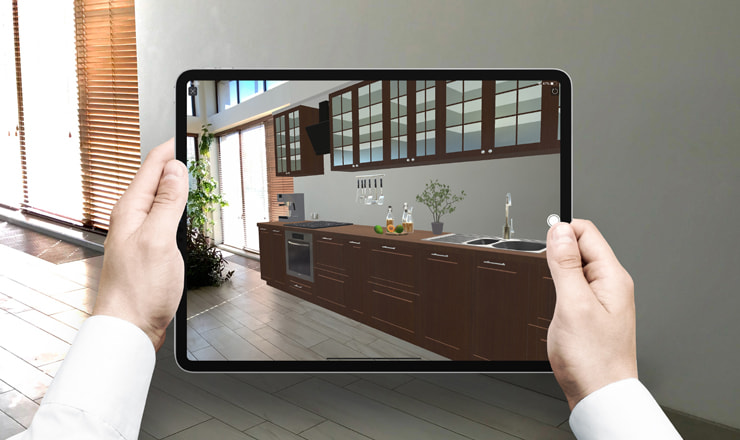
Revolutionize Your Space: Mastering Augmented Reality Apps for Interior Design Planning
In the rapidly evolving world of home aesthetics, augmented reality apps for interior design planning are no longer a futuristic concept but an indispensable tool for homeowners, designers, and real estate professionals alike. Imagine effortlessly transforming your living space, experimenting with new furniture layouts, or selecting the perfect paint color, all without lifting a finger or making a single costly mistake. These innovative AR tools offer unparalleled 3D visualization and real-time previews, allowing you to virtually stage your home, plan renovations, and make informed design decisions with unprecedented confidence. This comprehensive guide will delve deep into how these powerful applications are reshaping our approach to home decor and spatial awareness, providing you with the expert insights needed to leverage their full potential.
The Transformative Power of Augmented Reality in Interior Design
Augmented reality (AR) technology overlays digital information onto the real world, enhancing our perception and interaction with our environment. When applied to interior design, this means you can see how a new sofa looks in your living room, how a different wallpaper changes the ambiance of a bedroom, or how a specific tile pattern fits your kitchen floor, all through your smartphone or tablet camera. This seamless integration of the virtual and physical realms eliminates guesswork, offering an immersive experience that traditional design methods simply cannot match. Industry reports indicate a significant surge in the adoption of digital staging tools, reflecting a clear trend towards more interactive and less speculative design processes.
Beyond Imagination: Key Benefits of AR Interior Design Apps
The advantages of incorporating AR into your interior design workflow are numerous and profound, extending far beyond mere aesthetics. These apps empower users with capabilities that save time, money, and reduce the stress often associated with home improvement projects.
- Visualizing with Precision: AR apps allow you to see furniture, decor items, and even structural changes in your actual space, to scale. This virtual try-on capability ensures that what you envision aligns perfectly with reality, preventing costly surprises after purchase or installation.
- Cost and Time Efficiency: By previewing designs virtually, you can avoid expensive errors like buying furniture that doesn't fit or paint colors that clash. This significantly reduces the need for returns, repurchases, and rework, saving both money and precious time in your home renovation journey.
- Enhanced Decision-Making: With the ability to instantly swap out items, change colors, and rearrange layouts, AR apps facilitate rapid experimentation. This iterative process allows you to explore countless possibilities and confidently arrive at the best design solution for your needs, boosting your aesthetic planning.
- Reduced Design Mistakes: The most significant benefit is the drastic reduction in common design pitfalls. No more struggling with tape measures and imagination; AR provides a direct visual confirmation of how elements will look and fit, fostering better furniture placement.
- Personalized Experience: These apps enable a highly personalized design journey. You can tailor every aspect of your space to your unique taste and functional requirements, ensuring the final outcome truly reflects your personality and lifestyle.
How Augmented Reality Apps Revolutionize Interior Design Planning
The core of AR's revolutionary impact lies in its ability to bring abstract ideas into tangible, real-world contexts. Instead of relying on sketches, mood boards, or even physical samples, you can now project high-fidelity 3D models directly into your home. This capability transforms the entire interior design visualization process, making it more accessible and intuitive for everyone, regardless of their design expertise. From homeowners planning a simple room refresh to professional designers pitching complex projects, AR provides a common, interactive ground for collaboration and decision-making.
Core Functionalities and Features to Look For
While the specific features vary between apps, most leading AR interior design solutions offer a robust set of functionalities designed to streamline your planning process. When evaluating potential apps, consider these essential capabilities:
- 3D Model Libraries: A comprehensive database of furniture, decor, fixtures, and materials from various brands is crucial. The quality and variety of these digital assets directly impact the realism and utility of the app. Look for apps that allow you to import your own models or access real products from retailers.
- Real-Time Visualization: This is the cornerstone of AR. The ability to instantly place and view virtual objects in your physical space, adjusting their position and rotation with simple gestures, is paramount for effective room planning.
- Accurate Measurements: Many advanced AR apps include digital measuring tools that can estimate dimensions within your room, helping you verify if a virtual furniture piece will physically fit. While not always 100% precise, they offer a strong indication.
- Material & Texture Swapping: Beyond just placing objects, the best apps allow you to experiment with different finishes, fabrics, and paint colors on walls, floors, and furniture. This feature is invaluable for coordinating palettes and creating cohesive designs.
- Virtual Walkthroughs: Some sophisticated apps offer the ability to "walk through" your redesigned space in AR, providing an immersive experience from different angles and perspectives, enhancing your spatial awareness of the new layout.
- Design Sharing & Collaboration: The ability to save your designs, capture screenshots or videos, and easily share them with family, friends, or professional designers is key for gathering feedback and making collaborative decisions.
Choosing the Best Augmented Reality App for Your Interior Design Needs
With a growing number of augmented reality design tools flooding the market, selecting the right one can feel overwhelming. The "best" app often depends on your specific project, budget, and technical proficiency. However, by focusing on key criteria, you can narrow down your choices and find a tool that truly empowers your design journey. Popular examples include apps from IKEA, Wayfair, and dedicated design platforms like Houzz, each offering unique strengths tailored to different user needs.
Top Considerations for Selecting an AR Interior Design Tool
Making an informed decision requires a careful evaluation of several factors. Prioritize what matters most for your individual or professional design projects.
- Compatibility and Performance: Ensure the app is compatible with your device's operating system (iOS, Android) and that your device has sufficient processing power and camera capabilities for a smooth AR experience. Older devices may struggle with complex 3D visualization.
- User Interface and Ease of Use: A cluttered or unintuitive interface can quickly lead to frustration. Look for apps with a clean, user-friendly design that makes placing objects, changing textures, and navigating the virtual space effortless. Remember, the goal is to simplify, not complicate, home design planning.
- Furniture and Decor Database: Assess the size, quality, and relevance of the app's object library. Does it include items from brands you like? Are the 3D models realistic? Some apps specialize in certain styles or product types, so consider your design aesthetic.
- Measurement Accuracy: For projects requiring precise planning, the accuracy of the app's digital measuring tools is critical. While AR can approximate, always double-check with a physical tape measure for critical dimensions before making purchases.
- Collaboration Features: If you're working with a partner, family, or a professional designer, features that allow for easy sharing, commenting, and real-time collaboration on designs can be invaluable. This streamlines feedback and ensures everyone is on the same page.
- Cost and Subscription Models: Many basic AR apps are free, offering limited features or smaller libraries. Premium versions or professional-grade design tools often come with subscription fees, providing access to extensive features, larger databases, and advanced functionalities like high-resolution rendering. Weigh the cost against the features you truly need.
Practical Tips for Maximizing Your AR Interior Design Experience
While AR apps are designed to be intuitive, a few strategic approaches can significantly enhance your experience and the accuracy of your virtual room planning. These tips will help you get the most out of your chosen augmented reality design app and ensure your virtual designs translate seamlessly into reality.
Optimizing Your Virtual Room Planner Journey
- Prepare Your Space: For the most accurate AR experience, ensure your physical room is well-lit and clear of clutter. AR technology relies on identifying distinct features in your environment, so a clean, well-lit space allows the app to map your room more effectively and provide better spatial awareness.
- Calibrate Accurately: Most AR apps require you to scan your floor or walls to establish scale. Follow these instructions carefully, moving your device slowly and steadily. Proper calibration is crucial for ensuring that virtual furniture appears at the correct size and proportion within your room.
- Experiment Extensively: Don't be afraid to play around! The beauty of AR is the ability to experiment without consequence. Try different furniture arrangements, color schemes, and decor items. This is your chance to explore possibilities you might not have considered otherwise, optimizing your furniture placement.
- Use Real-World Measurements: While AR apps provide good estimates, always double-check critical dimensions with a physical tape measure before making purchases. This ensures that the beautiful sofa you virtually placed will actually fit through your doorway and into its designated spot.
- Involve Stakeholders: If you're designing for a shared space, involve others early in the process. Use the app's sharing features to get feedback from family members or housemates. This collaborative approach ensures everyone's needs and preferences are considered, leading to a more harmonious final design.
- Leverage Sharing Features: Take screenshots or record videos of your virtual designs. These visual aids are incredibly powerful when discussing ideas with contractors, interior designers, or even just for your own reference. They help bridge the gap between imagination and actionable plans.
The Future Landscape: What's Next for AR in Home Design?
The current capabilities of augmented reality apps for interior design planning are just the beginning. The technology is rapidly advancing, promising even more sophisticated and seamless experiences in the near future. We can expect to see deeper integration with artificial intelligence, more realistic rendering, and perhaps even hands-free design capabilities through next-generation AR devices. The evolution of digital staging tools is poised to make interior design planning more intuitive, precise, and accessible than ever before, further blurring the lines between imagination and reality.
Innovations Driving the Evolution of Digital Staging Tools
- AI Integration: Expect smarter AR apps that can provide personalized design recommendations based on your preferences, existing furniture, and even trending styles. AI could help curate furniture collections or suggest optimal layouts.
- Hyper-Realistic Rendering: As processing power increases, the visual fidelity of 3D models in AR will become virtually indistinguishable from real life. This will enhance the immersive experience and make virtual try-on even more convincing.
- Cross-Platform Synergy: Seamless integration between various design platforms, e-commerce sites, and AR apps will allow users to move effortlessly from inspiration to visualization to purchase.
- AR Glasses Integration: The advent of consumer-ready AR glasses could revolutionize interior design, allowing for hands-free, real-time 3D visualization as you walk through your home, making adjustments with simple gestures or voice commands.
Frequently Asked Questions About AR Interior Design Apps
What are the primary benefits of using AR apps for interior design?
The primary benefits of using augmented reality apps for interior design planning include enhanced 3D visualization, significant cost and time savings by preventing design errors, improved decision-making through rapid experimentation, and a highly personalized immersive experience that allows you to see how furniture and decor will look in your actual space before making any purchases or commitments. They provide a realistic virtual try-on capability for home furnishings.
Are augmented reality apps accurate for furniture placement and sizing?
Modern augmented reality apps are remarkably accurate for furniture placement and relative sizing, especially in well-lit environments with clear floor surfaces. They use your device's camera and sensors to map your space and project 3D models to scale. However, for critical dimensions (e.g., ensuring a sofa fits through a doorway), it's always recommended to double-check with a physical tape measure, as AR accuracy can vary slightly depending on device calibration and environmental factors.
Can I use these apps for major home renovation projects?
While augmented reality apps excel at room planning and visualizing furniture and decor, their utility for major home renovation projects is typically limited to visualizing the aesthetic outcomes rather than structural changes. They are excellent for seeing how new paint, flooring, or even a different window style might look. For structural changes, plumbing, or electrical work, you'll still need professional architects, contractors, and specialized CAD/BIM software, although AR can help visualize their proposed designs.
What's the difference between AR and VR in interior design?
The key difference lies in how they integrate with your reality. Augmented Reality (AR) overlays digital elements onto your real-world view, enhancing it (e.g., using your phone camera to see a virtual sofa in your living room). Virtual Reality (VR), on the other hand, creates a completely simulated environment, fully immersing you in a digital world (e.g., wearing a headset to "walk through" a virtual model of a designed room). AR is generally more accessible for quick visualizations in your existing space, while VR offers deeper, fully simulated immersive experience for complex design tools.
How do I choose the right AR interior design app for my specific project?
To choose the right AR interior design app, consider your project's scope, your device's compatibility, and your budget. Look for apps with a user-friendly interface, a comprehensive 3D model library relevant to your style, and features like real-time visualization and material swapping. If collaboration is important, prioritize apps with sharing features. Read reviews and try out free versions or trials to assess ease of use and the quality of spatial awareness and digital measuring tools before committing to a paid subscription.

0 Komentar