
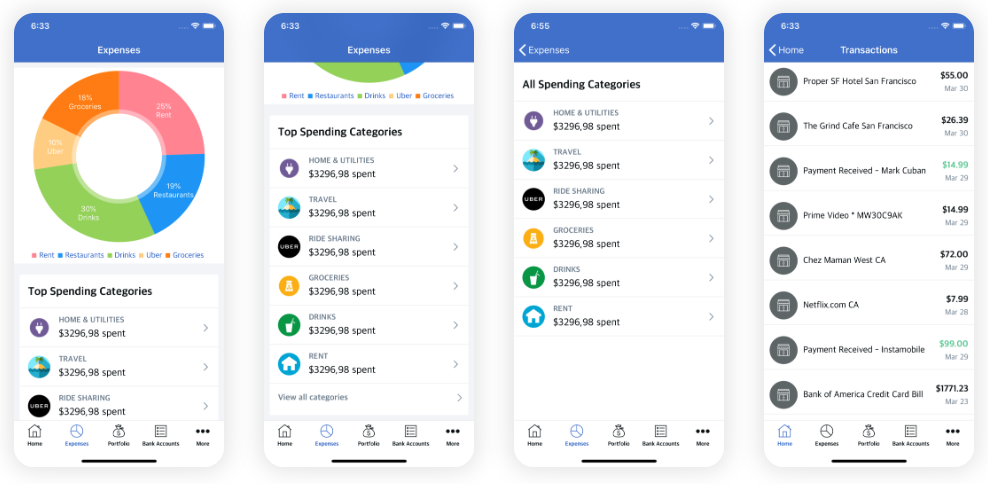
The Best Budgeting Apps for Personal Finance: Your Ultimate Guide to Financial Freedom
In today's fast-paced world, gaining control over your finances is no longer a luxury but a necessity. The journey to financial freedom often begins with a clear understanding of your income and expenses. This is where the best budgeting apps for personal finance become indispensable tools. They transform the often-daunting task of money management into an intuitive, accessible, and even enjoyable process. Whether you're aiming for significant debt reduction, building robust savings goals, or simply wanting to see where your money truly goes, a powerful budgeting application can be your most reliable ally. This comprehensive guide will navigate you through the top contenders, highlighting their features, benefits, and how they can revolutionize your financial management.
Why Budgeting Apps Are Essential for Modern Financial Management
Gone are the days of cumbersome spreadsheets and manual ledger entries. Modern money management tools offer real-time insights, automation, and a holistic view of your financial landscape. For anyone looking to optimize their cash flow, identify wasteful spending habits, and make informed financial decisions, these applications are game-changers. They cater to a wide spectrum of users, from students managing their first paychecks to seasoned professionals overseeing complex portfolios.
Beyond Spreadsheets: The Digital Advantage in Expense Tracking
The digital revolution has brought unparalleled convenience to expense tracking. Budgeting apps automatically categorize transactions, sync with your bank accounts, and provide visual summaries of your financial health. This automation saves countless hours and significantly reduces the potential for human error. Instead of dreading your monthly budget review, you can look forward to a clear, actionable dashboard that empowers you to take control. These platforms are more than just trackers; they are proactive partners in your pursuit of financial wellness, offering insights that traditional methods simply cannot match.
Key Features to Look for in a Budgeting App
Choosing the right budgeting app can feel overwhelming given the plethora of options available. To ensure you select a tool that genuinely meets your needs, consider the following essential features:
Automatic Transaction Tracking and Categorization
- Seamless Bank Synchronization: The ability to securely link to your bank accounts, credit cards, and investment accounts is paramount. This automates the import of transactions, eliminating manual data entry.
- Intelligent Categorization: Look for apps that can automatically categorize your spending (e.g., groceries, utilities, entertainment). The best apps allow you to customize these budget categories and create rules for future transactions.
Customizable Budget Categories and Goal Setting
- Flexible Budget Creation: Your financial life is unique. An ideal app allows you to create custom budget categories, set spending limits for each, and easily adjust them as your circumstances change.
- Specific Savings Goals: Whether it's a down payment for a house, a vacation, or an emergency fund, the app should enable you to set clear savings targets and track your progress towards them. This visual progress can be a powerful motivator.
Bill Reminders, Debt Management, and Reporting
- Timely Bill Alerts: Never miss a payment again. Apps that offer reminders for upcoming bills can help you avoid late fees and maintain a good credit score.
- Integrated Debt Payoff Tools: For those focused on debt reduction, some apps offer specific features like debt snowball or avalanche calculators, providing a clear path to becoming debt-free.
- Robust Reporting & Visualization: Understanding your spending habits is key. Look for apps that provide clear graphs, charts, and reports on your income, expenses, and net worth over time. These insights are crucial for effective financial planning.
Security and Privacy Measures
- Encryption and Authentication: Your financial data is sensitive. Ensure the app uses bank-level encryption (e.g., 256-bit AES) and offers multi-factor authentication for login security.
- Privacy Policy: Read the privacy policy carefully to understand how your data is collected, used, and shared. Reputable apps prioritize your privacy.
Top Contenders: The Best Budgeting Apps for Every Need
Here’s a breakdown of some of the leading personal finance software options, each catering to different budgeting philosophies and user preferences.
YNAB (You Need A Budget): For the Zero-Based Budgeter
YNAB stands out for its unique zero-based budgeting philosophy, where every dollar is assigned a job. This proactive approach encourages users to be intentional with their money. It's not just about tracking; it's about planning. YNAB is renowned for its excellent educational resources and active community, making it a powerful tool for those committed to truly transforming their financial management.
- Pros:
- Forces intentional spending by assigning every dollar a purpose.
- Excellent for breaking the paycheck-to-paycheck cycle.
- Robust goal tracking and forecasting features.
- Strong community support and educational materials.
- Cons:
- Steep learning curve for new users.
- Subscription-based, which might be a deterrent for some.
- Requires consistent engagement to be effective.
- Ideal User: Someone committed to a hands-on, proactive approach to budgeting, willing to invest time in learning the system, and serious about achieving financial freedom.
Mint: For Comprehensive Tracking and Simplicity
As one of the most popular free money management apps, Mint offers a broad overview of your financial life. It connects to virtually all your accounts, providing a dashboard for your spending, investments, and net worth. Mint excels at automatic categorization and offers bill reminders, making it a great entry point for those new to digital budgeting.
- Pros:
- Completely free to use.
- User-friendly interface, easy to get started.
- Comprehensive overview of all accounts (bank, credit, investment).
- Bill reminders and credit score tracking.
- Cons:
- Less emphasis on proactive budgeting compared to YNAB.
- Contains ads, which can be intrusive.
- Categorization can sometimes be inaccurate, requiring manual adjustments.
- Ideal User: Individuals seeking a free, easy-to-use financial tracker for an overall view of their finances and basic expense tracking.
Personal Capital (now Empower Personal Wealth): For Investment-Focused Financial Planning
While Personal Capital offers budgeting features, its true strength lies in its robust investment tracking and wealth management tools. It provides a detailed analysis of your portfolio, fee analyzer, and retirement planner. If you have significant investments and want a holistic view of your net worth alongside your daily spending, this app is an excellent choice.
- Pros:
- Outstanding investment tracking and analysis tools.
- Comprehensive net worth calculation.
- Retirement planner and fee analyzer.
- Free to use for basic features.
- Cons:
- Budgeting features are less detailed than dedicated budgeting apps.
- Users may receive calls for wealth management services (though not mandatory).
- Ideal User: Investors and high-net-worth individuals who want to track their entire financial picture, including investments, alongside basic budgeting.
Simplifi by Quicken: For an All-in-One Approach Without Complexity
Simplifi by Quicken offers a modern, streamlined approach to personal finance. It combines robust transaction tracking, customizable budget categories, and clear insights without the complexity often associated with Quicken's desktop software. It focuses on helping you understand your "money left to spend" and provides a clear picture of your cash flow.
- Pros:
- Clean, intuitive interface.
- Real-time spending insights and customizable dashboards.
- Tracks subscriptions, bills, and recurring income.
- Strong reporting on spending and savings.
- Cons:
- Subscription fee required.
- Less granular control than YNAB for some budgeting styles.
- Ideal User: Those looking for a balanced, modern budget planner that offers automated insights and clear spending guidance without being overly complex.
EveryDollar: For Dave Ramsey Followers
EveryDollar is the official budgeting app endorsed by financial guru Dave Ramsey. It champions a zero-based budgeting approach, similar to YNAB, but with a focus on Ramsey's "Baby Steps" for debt elimination and wealth building. It's straightforward and ideal for those who resonate with the Ramsey philosophy.
- Pros:
- Simple, clean interface.
- Aligns perfectly with Dave Ramsey's financial principles.
- Manual entry is free; paid version offers bank connectivity.
- Focuses on intentional spending and debt payoff.
- Cons:
- Limited features in the free version (no bank sync).
- Less flexible for those not strictly following the Ramsey plan.
- Ideal User: Individuals committed to Dave Ramsey's "Baby Steps" and a zero-based budgeting method, especially those focusing on aggressive debt reduction.
Actionable Tips for Maximizing Your Budgeting App's Potential
Simply downloading an app isn't enough; consistent engagement and smart practices are key to unlocking its full power and achieving your savings goals.
Start Small, Stay Consistent
- Don't Overwhelm Yourself: Begin by linking your primary accounts and focusing on tracking your main expense categories. As you get comfortable, you can add more complexity.
- Daily Check-ins: Make it a habit to open your app for a few minutes each day. This helps you stay on top of transactions and prevents a backlog of uncategorized spending.
- Regular Review Sessions: Schedule a weekly or bi-weekly deep dive into your budget. This is where you adjust categories, review progress towards savings goals, and identify areas for improvement.
Categorize Diligently and Link All Accounts
- Be Specific, But Not Overly Granular: While "Groceries" is good, "Fancy Coffee" might be too much. Find a balance that gives you insight without creating unnecessary work. Consistency in categorization is crucial for accurate expense tracking.
- Link Every Financial Account: For a true picture of your net worth and cash flow, connect all bank accounts, credit cards, loans, and investment platforms. This holistic view is essential for effective financial planning.
Set Realistic Goals and Automate Where Possible
- Achievable Targets: Your budget should be a tool for success, not frustration. Set realistic spending limits and savings goals based on your income and current situation. Adjust them as needed.
- Automate Savings Transfers: Many apps integrate with banking features to help you automate transfers to your savings accounts. Set up recurring transfers to align with your savings goals – "pay yourself first" is a powerful principle.
- Utilize Alerts and Reminders: Turn on notifications for upcoming bills, large transactions, or when you're approaching a budget limit. These proactive alerts can prevent overspending and late payments.
Frequently Asked Questions
What is the best free budgeting app for personal finance?
Among the free options, Mint is widely regarded as one of the best due to its comprehensive features, user-friendly interface, and ability to link to a vast array of financial institutions. It provides an excellent overall view of your finances, including expense tracking, bill reminders, and credit score monitoring, making it a powerful free financial tracker.
How do budgeting apps ensure data security?
Reputable budgeting apps prioritize data security by employing bank-level encryption (typically 256-bit AES), multi-factor authentication (MFA), and read-only access to your financial accounts. This means they can view your transaction data but cannot initiate transfers or move money. They also adhere to strict privacy policies, often undergoing regular security audits to protect your sensitive financial information.
Can budgeting apps really help me save money effectively?
Absolutely. Budgeting apps are highly effective for saving money because they provide unparalleled visibility into your spending habits and cash flow. By categorizing expenses, setting savings goals, and offering visual progress reports, they help you identify areas where you can cut back, stay accountable, and make intentional choices about your money. The automated tracking and insights empower users to make smarter financial decisions, leading to significant savings over time and accelerating debt reduction.
Are budgeting apps worth the subscription cost?
For many, the benefits of paid money management tools far outweigh their subscription costs. Premium apps often offer more advanced features like detailed financial planning tools, personalized advice, ad-free experiences, superior customer support, and deeper analytical insights into your net worth and investments. If a paid app helps you save more money, reduce debt faster, or gain a clearer understanding of your finances than a free alternative, then the investment is undoubtedly worthwhile for your long-term financial management.
How often should I check my budgeting app?
For optimal results, it's recommended to check your budgeting app at least a few times a week, if not daily, for a quick review of new transactions and budget adherence. A more in-depth review should be conducted weekly or bi-weekly to adjust budget categories, assess progress toward savings goals, and plan for upcoming expenses. Consistent engagement ensures your budget remains accurate, relevant, and an effective tool for your financial planning.

0 Komentar