
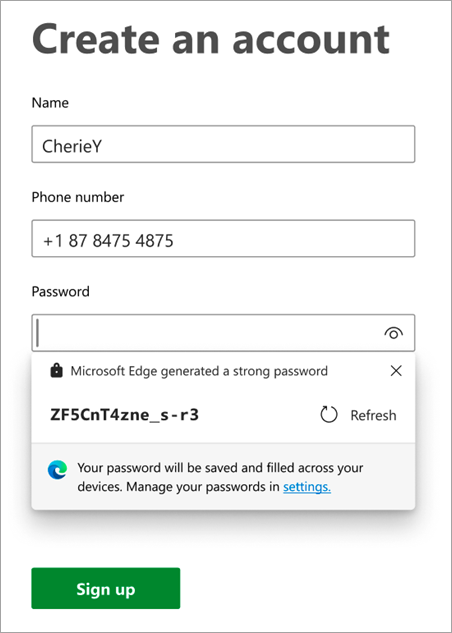
The Ultimate Guide to the Best Password Generators for Strong Passwords
In an increasingly digital world, your online identity and sensitive data are constantly under threat. The cornerstone of robust cybersecurity is undeniably a strong, unique password. Yet, crafting these complex combinations manually is not only cumbersome but often leads to predictable patterns, making them vulnerable to sophisticated brute-force attacks and dictionary attacks. This is precisely where the best password generators for strong passwords become indispensable tools. This comprehensive guide will delve deep into why these tools are crucial, what makes them effective, and how to leverage them to fortify your digital defenses against ever-evolving threats, ensuring unparalleled online security and peace of mind.
Why Strong Passwords Are Non-Negotiable in Today's Digital Landscape
The digital realm is fraught with peril. Every day, millions of login attempts occur, many of which are malicious. Weak or reused passwords are the easiest entry points for cybercriminals, leading to devastating consequences like identity theft, financial fraud, and data breaches. Industry statistics consistently show that a significant percentage of security incidents stem from compromised credentials. A strong password acts as your primary line of defense, a digital fortress protecting your personal information, financial accounts, and professional data.
Traditional password creation methods often fall short. Users tend to create memorable passwords using personal information, common words, or simple patterns, making them highly susceptible to various hacking techniques. This is where the concept of password entropy becomes critical. High entropy means a password is truly random and unpredictable, making it exponentially harder for attackers to guess. Manual creation rarely achieves the necessary level of entropy required for true data protection.
The Evolving Threat Landscape and Password Vulnerabilities
- Brute-Force Attacks: Automated programs systematically try every possible character combination until the correct password is found. The longer and more complex a password, the longer this process takes, often making it computationally infeasible.
- Dictionary Attacks: Attackers use lists of common words, phrases, and previously breached passwords to try and gain access. Passwords based on real words are highly vulnerable.
- Phishing and Social Engineering: While not directly targeting password strength, these tactics aim to trick users into revealing their credentials. Even then, a unique, random password makes it harder for criminals to reuse it across multiple platforms if one account is compromised.
- Credential Stuffing: When one service suffers a data breach and user credentials are leaked, attackers will "stuff" those credentials into login forms on other popular services (e.g., banking, email, social media), hoping users have reused their passwords.
What Exactly is a Password Generator and How Does It Work?
A password generator is a software tool or online service designed to create random, complex, and highly secure passwords. Unlike human-generated passwords, which often contain predictable elements, these tools leverage cryptographic random number generators to produce strings of characters that are virtually impossible to guess or crack through conventional means. They typically allow users to specify parameters such as length, character types (uppercase letters, lowercase letters, numbers, symbols), and sometimes even exclude ambiguous characters (like 'l' and '1').
The core principle behind a robust password generator is randomness. It doesn't rely on patterns, personal data, or common phrases. Instead, it pulls characters from a vast pool, combining them in a way that maximizes their unpredictability and therefore, their password strength. This process ensures high entropy, making each generated password a unique, formidable barrier against unauthorized access.
The Mechanics Behind Random Password Creation
Most reputable password generators utilize strong cryptographic random number generators (CRNGs). These are algorithms designed to produce sequences of numbers that are practically indistinguishable from true randomness, making them suitable for security applications. The output of these CRNGs is then mapped to the specified character sets (e.g., ASCII characters for letters, numbers, and symbols) to construct the final password string. This ensures that every character has an equal probability of appearing at any position, leading to maximum randomness and complexity. Some advanced generators even offer options for creating secure passphrases, which are sequences of random, unrelated words that are easier to remember but still offer high security due to their length and unpredictability.
Key Features of an Excellent Password Generator
Choosing the right password creation tool is vital. While many free options exist, not all are created equal. Here are the essential features to look for when selecting the best password generators:
- True Randomness: The generator must use a cryptographically secure random number generator (CSPRNG) to ensure unpredictability. Avoid tools that seem to generate patterns or predictable sequences.
- Customizable Parameters: The ability to define password length (typically 12-30+ characters), include/exclude specific character types (uppercase, lowercase, numbers, symbols), and avoid ambiguous characters (e.g., 'O' vs. '0', 'l' vs. '1').
- Offline Functionality: For maximum security, an offline generator (desktop application or browser extension that works locally) is preferable, as it minimizes exposure to online threats.
- Open-Source Code: Transparency is key in security tools. Open-source generators allow security experts to audit the code for vulnerabilities or backdoors, building trust.
- No Data Logging: Crucially, the generator should not log or store any passwords it creates. This is especially important for online generators.
- Passphrase Generation: The option to generate strong, memorable passphrases (e.g., "correct horse battery staple") by combining random words.
- Integration with Password Managers: Many top-tier password managers (like LastPass, 1Password, Bitwarden) have built-in password generators, offering a seamless workflow for generating and storing credentials.
- User-Friendly Interface: While security is paramount, an intuitive interface makes the tool accessible for everyday use.
Types of Password Generators: Online vs. Offline
Password generators generally fall into two main categories:
1. Online Password Generators
These are web-based tools accessible directly through your browser. They are convenient because they require no installation and can be used on any device with an internet connection. However, they come with inherent security considerations. While reputable online generators claim not to log or store generated passwords, transmitting any data over the internet always carries a slight risk, even if the generation happens client-side (in your browser). Always use a trusted, well-known online service if you opt for this method.
Pros:
- Highly accessible, no installation required.
- Cross-device compatibility.
- Reliance on internet connection.
- Potential (though often minimal) security concerns regarding data transmission, even if client-side.
- Risk of malicious ads or scripts on less reputable sites.
2. Offline Password Generators (Desktop Apps & Browser Extensions)
These are software applications installed directly on your computer or browser extensions that run locally. They generate passwords without sending any data over the internet, making them generally more secure. Many popular password managers include robust built-in generators, offering the best of both worlds: secure generation and secure storage.
Pros:
- Enhanced security as passwords are generated locally, off the internet.
- No reliance on an internet connection after initial installation.
- Often integrated with other security features, like password managers.
- Requires installation.
- May not be as readily available across all devices unless synced via a password manager.
For optimal security best practices, an offline generator or one integrated into a reputable password manager is highly recommended.
How to Use a Password Generator Effectively for Maximum Security
Generating a strong password is only half the battle; using it correctly is equally important. Here's how to integrate password generators into your daily routine:
- Choose a Reputable Generator: Select a tool that meets the criteria outlined above (true randomness, customization, no logging). Many of the best password managers have excellent built-in generators.
- Define Your Parameters:
- Length: Aim for at least 16 characters for critical accounts (email, banking) and a minimum of 12 for others. Longer is always better.
- Character Types: Ensure your password includes a mix of uppercase letters, lowercase letters, numbers, and symbols.
- Generate and Copy: Use the generator to create your password. Most tools will allow you to copy it to your clipboard.
- Paste Immediately: Paste the generated password directly into the "new password" and "confirm password" fields on the website or application you're signing up for or updating.
- Do NOT Memorize (Use a Password Manager): This is perhaps the most crucial step. Do not try to memorize complex, random passwords. Instead, immediately save them in a secure, encrypted password manager. This tool will store all your unique, strong passwords and autofill them when needed, making your digital life both secure and convenient.
- Enable Two-Factor Authentication (2FA): Even with the strongest password, 2FA adds an extra layer of security. Always enable it where available. For more information on enhancing your security, consider exploring the benefits of two-factor authentication.
Integrating Password Generators with Your Overall Security Ecosystem
A password generator is a powerful component, but it's most effective when part of a broader cybersecurity strategy. The synergy between a robust generator and a reliable password manager is unparalleled.
The Indispensable Role of Password Managers
Think of a password manager as your secure vault for all your unique, generated passwords. It encrypts and stores them, remembers them for you, and often includes its own high-quality password generator. This integrated approach ensures that you never have to reuse passwords, and each account is protected by a truly random, complex string of characters. Popular examples include Bitwarden, LastPass, 1Password, and Dashlane. These tools not only generate and store but also often audit your existing passwords for strength and potential breaches, providing a holistic approach to your digital footprint security.
Beyond Passwords: A Layered Security Approach
While strong, generated passwords are foundational, they are part of a multi-layered defense strategy:
- Regular Software Updates: Keep your operating system, browsers, and applications updated to patch security vulnerabilities.
- Antivirus/Anti-Malware Software: Protect your devices from malicious software that could capture your inputs.
- Phishing Awareness: Learn to recognize and avoid phishing attempts that try to trick you into revealing your credentials.
- Public Wi-Fi Caution: Be wary of using public Wi-Fi for sensitive transactions. Use a Virtual Private Network (VPN) if you must.
- Data Backups: Regularly back up your important data to protect against ransomware and data loss.
By combining the power of the best password generators with these broader security best practices, you build a formidable defense against the vast majority of online threats.
Frequently Asked Questions
What is the ideal length for a strong password generated by a password generator?
While opinions vary slightly among cybersecurity experts, the general consensus for a truly strong password is a minimum of 12-16 characters. For highly sensitive accounts like banking, email, or cloud storage, aim for 20 characters or more. The longer the password, and the more diverse the characters (uppercase, lowercase, numbers, symbols), the higher its entropy and the harder it is to crack through brute-force attacks.
Are online password generators safe to use?
Reputable online password generators from well-known cybersecurity companies are generally considered safe, as they typically generate passwords client-side (in your browser) and do not log or store the generated passwords on their servers. However, for maximum data protection and peace of mind, an offline generator (desktop application) or one integrated into a trusted password manager is often preferred because it completely eliminates any internet transmission risk. Always verify the reputation of any online tool before using it.
Should I use a password manager with a password generator?
Absolutely, yes! Using a password manager in conjunction with a password generator is considered a leading security best practice. Password managers not only provide a secure, encrypted vault to store all your unique, randomly generated passwords but also often include powerful built-in generators. This seamless integration allows you to generate a strong, unique password for every single online account without needing to memorize them, significantly enhancing your overall online security and simplifying your digital life.
How often should I change passwords generated by these tools?
The traditional advice of changing passwords every 90 days has evolved. If you are using unique, long, and complex passwords generated by a reliable tool and stored in a secure password manager, frequent changes are less critical. Instead, focus on changing passwords immediately if there's any indication of a data breach involving that service, if you suspect your account has been compromised, or if you shared it temporarily. Regularly reviewing your password strength within your password manager and ensuring two-factor authentication is enabled wherever possible provides more practical security than arbitrary, frequent changes.

0 Komentar